
Choose the Right CarPlay Setup for Your Pontoon
Compare factory Crest and Balise systems, aftermarket marine displays, and a phone-mount setup for charts, routing, depth, traffic, and cost.
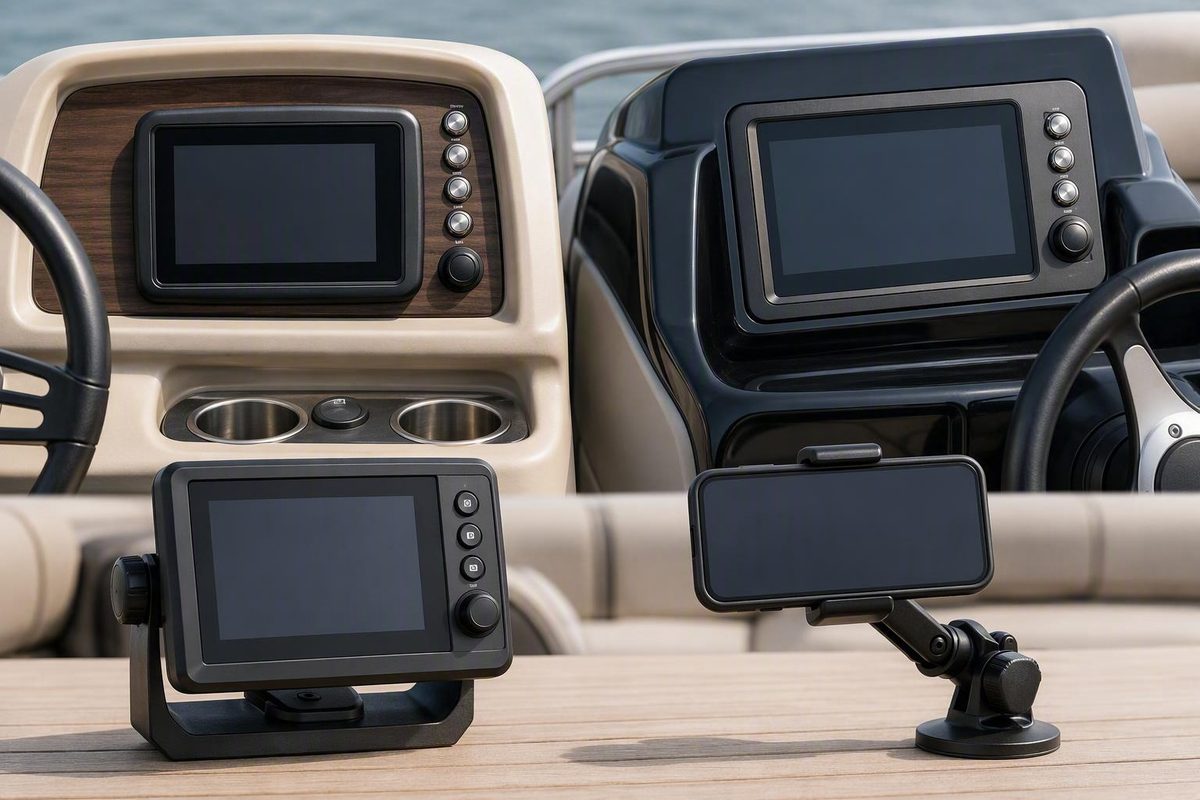
Apple CarPlay is available at a pontoon helm, but the factory option is limited to announced model-year 2027 Crest Conquest, Crest Caribbean, and Balise boats launching from September 2026. Every other pontoon needs a compatible aftermarket marine head unit to put CarPlay on the helm display. If that expense is hard to justify, a secure phone mount running Savvy Navvy delivers the core navigation functions without CarPlay.
Choose your boat, phone, and spending level to see the most practical setup.
Answer three questions. The result distinguishes a factory display, an aftermarket installation, and direct phone navigation.
Run Savvy Navvy directly on the iPhone. This provides charts and routing without buying a CarPlay helm display.
- Dedicated helm-display cost: —
- Needs secure power, mounting, weather protection, and heat management.
- CarPlay at helm: No; navigation remains on the phone.
Eligible boats: all model-year 2027 Balise models, plus 2027 Crest Conquest and Caribbean models.
Cost: eligible new boat plus future subscription terms; exact amount —.
Requires explicit CarPlay or Android Auto support, Savvy Navvy compatibility, protected power, mounting, and wiring.
Cost: display + installation + eligible app plan; exact amount —.
Runs Savvy Navvy directly on the phone. A secure mount, power, weather protection, and heat management remain necessary.
Cost: mount + power arrangement + eligible app plan; exact amount —.
| Path | Cost Components | Charts and Routing | Depth and Traffic | Helm Projection | Key Limitation |
|---|---|---|---|---|---|
| Factory 2027 Crest/Balise | Eligible new boat + future plan; exact $ — | Yes, through Savvy Navvy | Charted bathymetry and app traffic; live sensor depth — | CarPlay or Android Auto | Only announced eligible 2027 lines; final hardware and deliveries were unconfirmed |
| Aftermarket marine display | Display + mounting + wiring + labour + plan; exact $ — | Yes, through Savvy Navvy | Charted bathymetry and app traffic; live sensor depth — | Yes, if exact display supports the phone OS | Compatibility, fit, weather protection, and integration require verification |
| Phone mount + app | Mount + power arrangement + plan; exact $ — | Yes, on the phone | Charted bathymetry and app traffic; live sensor depth — | No | Smaller exposed screen; glare, charging, and overheating remain concerns |
Depth: Bathymetry means charted depth, not confirmed live transducer depth.
Traffic: Nearby-boat information can come from the app; it does not prove onboard AIS.
Offline: Downloaded charts reportedly remain available, but dynamic services may require connectivity.
Sources: Savvy Navvy’s CarPlay and Android Auto announcement and August 2026 reporting from 9to5Mac, SlashGear, and Heise. No boat, display, installation, mount, or subscription prices were supplied; exact costs are shown as —.
Factory CarPlay Is Limited to Specific 2027 Pontoons
The announced factory rollout covers all new model-year 2027 Balise boats and the model-year 2027 Crest Conquest and Caribbean lines. Apple CarPlay and Android Auto are reported as standard, with launches expected to begin in September 2026 (SlashGear’s model and release report).
| Brand | Eligible Models | Status | Reported Launch |
|---|---|---|---|
| Balise | All 2027 models | CarPlay and Android Auto standard | From September 2026 |
| Crest | 2027 Conquest | CarPlay and Android Auto standard | From September 2026 |
| Crest | 2027 Caribbean | CarPlay and Android Auto standard | From September 2026 |
The announcement does not extend to every Crest pontoon. It also does not confirm identical hardware, availability, or option packaging in every market.
As of August 2026, the September launch was still forthcoming. The supplied evidence did not confirm customer deliveries, dealer inventory, final production hardware, or independent testing aboard completed boats (9to5Mac’s launch report). A buyer should therefore verify the actual hull rather than relying on a model-year brochure.
Ask the dealer to identify the display manufacturer and model, whether the connection is wired or wireless, which chart access is included, when that access expires, and whether the system connects to any boat sensors. The available reporting does not establish the exact display, connection method, regional availability, or integration with engine and navigation networks.
Savvy Navvy Provides the Marine Navigation
CarPlay is the phone-to-screen interface. It does not supply nautical charts or marine routing, and ordinary Apple Maps does not become a marine chartplotter when displayed at the helm.
In the announced Crest and Balise system, Savvy Navvy supplies the marine-navigation layer. Its reported functions include day, night, satellite, 2D, and 3D chart presentations; smart route planning; marina, harbour, and anchorage searches; saved markers; bathymetry; current position; speed; estimated arrival time; remaining time and distance; the next manoeuvre; nearby-boat traffic; and live location sharing.
These are reported product functions rather than findings from independent testing. Their availability can depend on the chart region, account, subscription, downloaded data, hardware, and internet connection. Heise’s overview describes charts, tides, weather, GPS tracking, and offline data while noting uncertainty about the map package included with the factory boats.
The typical workflow is to plan a trip in Savvy Navvy, save the route, download the necessary charts, connect the phone, and open the app through CarPlay. Savvy Navvy says the app can use compatible built-in displays and aftermarket marine head units through wired or wireless connections, depending on the equipment. Android Auto is supported for Android phones in the announced implementation (Savvy Navvy’s announcement).
AirPlay is not an alternative route to the same result. AirPlay handles media streaming on compatible equipment; CarPlay presents supported phone apps through a compatible display. Bluetooth, Wi-Fi, USB, AirPlay, or a touchscreen specification does not prove that a marine receiver supports CarPlay.
An Existing Pontoon Needs Compatible Helm Hardware
An incompatible display cannot normally gain CarPlay merely by installing an app or updating the phone. Retrofitting requires a marine-suitable display or head unit that explicitly supports CarPlay, plus documented support for the intended Savvy Navvy configuration.
An Android owner needs equivalent Android Auto support rather than CarPlay. A display advertised only as CarPlay-compatible should not be assumed to work with Android Auto.
The installation also needs protected power, circuit protection specified by the manufacturer, secure mounting, safe cable routing, and protection for the display’s rear enclosure and connections. The face of a product may be water-resistant while its connectors, cable joints, mounting cutout, or rear housing remain vulnerable.
Check the available dash area, cutout dimensions, depth behind the panel, viewing angle, glare, and clearance from the wheel, throttle, switches, windshield, and cup holders. A display that physically fits can still be a poor helm installation if the operator must look sharply downward or reach through the wheel.
Salt spray, humid air, UV exposure, vibration, condensation, and washdowns make the installation conditions more demanding. Coastal use warrants particular attention to sealed penetrations, corrosion-resistant terminals and fasteners, drainage, and salt-removal access. An automotive CarPlay receiver is not automatically suitable merely because it fits the opening.
No specific aftermarket display is verified here. The supplied evidence provides no display prices, installation quotes, or total retrofit costs. Obtain the exact manufacturer’s installation documentation and, where cutting or electrical work is required, a marine-electronics installation quote.
A Phone Mount Is the Honest Low-Cost Option
If the objective is Savvy Navvy’s charts and routing rather than a dashboard-sized interface, a securely mounted phone can run the app directly. This avoids buying and installing a CarPlay display, although it does not produce CarPlay on the helm.
The mount must hold the phone where it remains visible without obstructing the controls or forward view. The phone still needs dependable power, weather protection appropriate to the helm, and heat management in direct sun. A charging lead should not hang across the wheel or throttle.
This path retains the same basic phone dependency as a CarPlay installation, but with fewer links in the chain. There is no separate projection connection or helm display to troubleshoot. Its disadvantages are the smaller screen, greater exposure of the phone, and the possibility of glare or overheating.
No prices for the mount, display, installation, boat, or subscription were supplied. The valid cost comparison is therefore structural: the factory route involves purchasing an eligible new boat, the retrofit route adds hardware and installation to the app cost, and the phone-mount route avoids the dedicated display.
Charted Depth and Boat Traffic Are Not Onboard Sensors
Bathymetry shown by Savvy Navvy is charted depth information. It does not prove that the pontoon has a depth transducer or that the screen is showing live depth beneath the boat.
Nearby-boat traffic also does not establish that the pontoon carries an AIS receiver or transponder. The information can come from an app service rather than the vessel’s electronics. The same distinction applies to weather, sharing, and other dynamic information that may depend on connectivity.
The CarPlay announcement does not establish integration with sonar, live transducer depth, onboard AIS, engine gauges, fuel or battery monitoring, cameras, amplifiers, audio zones, NMEA 0183, or NMEA 2000. Those capabilities require separate documentation for the actual display and boat.
A boater who needs sonar imaging, radar, live depth, onboard AIS, engine data, or vessel-network control may need dedicated marine electronics. CarPlay with Savvy Navvy should be assessed as a phone-based navigation aid, not as a proven replacement for a chartplotter.
Offline Charts Require Advance Preparation
Savvy Navvy says charts downloaded to the app remain available offline at the helm. Download the chart region and saved route before leaving coverage, then test them at the dock with cellular data disabled.
Offline charts do not make every service offline. Weather, traffic, live sharing, account functions, updates, and other dynamic information may still require connectivity. If wireless CarPlay is being used, an offline test must preserve the Wi-Fi and Bluetooth connections required by the display.
A practical setup sequence is:
- Install Savvy Navvy and sign in.
- Select a plan that includes the required phone-to-display support.
- Download the chart areas needed for the trip.
- Plan, save, and inspect the route.
- Connect the phone to the compatible helm display.
- Open Savvy Navvy through CarPlay or Android Auto.
- Confirm that the displayed position is plausible.
- Test charging, disconnection, reconnection, and offline chart access.
The phone remains part of the system after the route appears on the helm. Guidance can be interrupted by a loose cable, wireless disconnection, depleted battery, overheating phone, app problem, display power loss, or missing chart download.
Subscription Access Depends on Region and Plan
As of August 2026, Savvy Navvy stated that CarPlay access was included with Premium and Premium+ plans in the United States and with the Elite plan elsewhere. Those plan names and regional terms can change.
Factory buyers should obtain the activation method, included chart regions, start and expiry dates, renewal price, automatic-renewal status, and cancellation method in writing. The supplied evidence does not provide a subscription price or confirm what remains usable after an included factory period expires.
Aftermarket and phone-mount users should make the same check before buying hardware around the app. A compatible display does not include a permanent navigation subscription unless the seller explicitly documents that entitlement.
Keep Navigation Independent of One Screen
A displayed route should be checked against the intended trip and the conditions on the water. Verify the chart region, understand where the position data comes from, and retain backup navigation suitable for the route. Depending on the water, that may mean another powered device, a dedicated chartplotter, paper charts, or a combination.
That redundancy is part of navigation risk management, not a claim that CarPlay is less reliable than another system. The supplied evidence contains no comparative failure rates.
Before departure, confirm that the route opens, the position is plausible, the phone charges, the screen is readable from the operating position, and the downloaded charts remain accessible without cellular service. Operators should also know how to leave the projected app and return to the boat’s primary controls.
The Best Path Depends on the Boat You Already Want
Choose the factory system if you are already shopping for an eligible 2027 Balise, Crest Conquest, or Crest Caribbean and the dealer can document the actual hardware, subscription entitlement, connection method, and delivery status. CarPlay alone is not a strong reason to buy an otherwise unsuitable pontoon.
Choose an aftermarket marine head unit when you want CarPlay or Android Auto on an existing pontoon and can confirm app support, helm fit, electrical requirements, environmental protection, and the complete installed cost. Do not rely on a marketplace listing that mentions only Apple compatibility, AirPlay, or Bluetooth.
Choose a phone mount when the main need is charts and routing and a larger projected display is not worth the hardware and installation. It is the simplest budget answer, provided the phone can be mounted, powered, cooled, and protected safely.
Whichever route you take, recheck the specifications immediately before ordering. The factory boats had not yet reached their reported September 2026 launch when the available evidence was reviewed, and no individual aftermarket display was independently verified for this guide.